
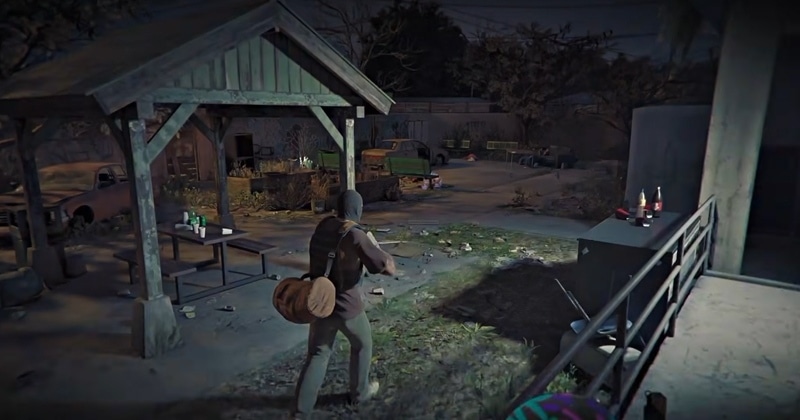
GTA 6 puts Jason and Lucia in Leonida, a sprawling state that includes Vice City. Its dense streets, rural roads, criminal hideouts, and layered systems reward players who pay attention to the details. Rockstar’s official materials confirm the setting and protagonists, but specific mechanics can vary with game updates and control settings. Check the in-game prompts if a button or interaction differs on your platform.
Stealth Tips for GTA 6
1. Try a face covering before using a cigarette
A mouth-covering ski mask is reported to shorten the cigarette-use animation, letting you restore focus faster during a fight. Test it somewhere safe before relying on it during a robbery or compound raid.
2. Use cover and alternate entrances
Look around the sides and rooftops of guarded locations for alternate ways in. A quiet entry can give you a better approach than walking through the front door.
3. Whistle to draw guards away
A whistle can lure a nearby guard toward your position. Use it to separate enemies from one another, but check the area first: guards within earshot may investigate too.
4. Watch the minimap for noise and concealment
The minimap may provide cues about how much noise you are making and whether you are hidden. Move slowly and crouch when approaching a guard; sprinting can give away your position.
5. Tag guards and vehicles with binoculars
When a phone scan cannot reach a target, try binoculars to inspect vehicles or mark people from farther away. Scouting before entering can help you plan a route and avoid patrols.
6. Bring a suppressor for quiet approaches
A suppressed weapon can help you manage threats without immediately drawing attention. It does not guarantee that a takedown will go unnoticed, so watch for nearby guards and witnesses.
7. Look for a stealth bonus in safes
Some compound safes may award a bonus for opening them without being detected. If you are trying to keep a low profile, prioritize quiet movement and avoid unnecessary kills.
8. Use nonlethal takedowns when possible
The supplied gameplay notes describe yellow hit markers as nonlethal hits and red markers as lethal ones. If your goal is to avoid killing enemies, pay attention to the hit feedback and use grapples or knockouts where available.
Combat and Robbery Tips
9. Practice hand-to-hand moves
Melee combat offers more options than basic punches. Try sprinting attacks, grapples, throws, and directional inputs in a low-risk encounter to learn which moves your character can perform.
10. Use grapples to control a fight
A grapple can lead into a throw, choke, or other close-range move. The exact controls depend on your platform and settings, so follow the on-screen prompts rather than assuming every input matches a video.
11. Swap shoulders while aiming
Changing your aiming shoulder can help you shoot around cover without exposing as much of your character. Use it when an enemy approaches from the opposite side or your current angle is blocked.
12. Shoot or operate a gate from the vehicle
If a gate blocks your escape, check whether you can reach its control from the car. The gameplay notes also describe shooting certain gates, but that can attract attention and may not work on every gate.
13. Avoid marked bills until you have a way to handle them
Marked cash can trigger a tracking or identification problem after a robbery. If you find suspicious bills, consider leaving them behind until you have unlocked the relevant countermeasure in your story progress.
14. Check the safe code before opening it
Search the shop or nearby rooms for a written combination before trying a safe. Getting the code first can save time while the alarm is active.
15. Use Snapmatic to investigate suspicious activity
Photos or posts on Snapmatic may point you toward locations worth checking. Follow leads on the map, then assess the area before approaching; an apparent opportunity can still involve armed or hostile people.
Vehicle Tips for GTA 6
16. Choose a rugged vehicle for rough terrain
A 4×4 or off-road build can handle grass and uneven ground better than a low-slung supercar. If a pursuit leaves the road, traction and durability may matter more than top speed.
17. Treat supercars as road vehicles
Fast cars can be fragile and difficult to control off-road. Save them for paved routes, and consider switching vehicles if your plan involves crossing fields or taking repeated impacts.
18. Inspect unique vehicles before driving away
Some vehicles found at compounds may be one-off finds. If you want to keep one, check your available garage or storage capacity before taking it away, and avoid selling it until you are sure you no longer want it.
19. Try a pre-made vehicle kit
A shop’s preset build may have better overall stats than a custom setup with every available part installed. Compare the displayed figures rather than assuming that every maximum upgrade produces the best all-round vehicle.
20. Ask a mechanic about changing a vehicle’s build
Some mechanics may offer a different setup, such as an off-road-oriented build for a vehicle that normally handles poorly away from paved roads. Check the available options and compare the trade-offs before spending money.
21. Rent a vehicle when you need a temporary ride
Vehicle rentals can be useful when you want a particular car without buying or permanently storing it. Check the rental terms in-game, since availability, price, and how long the car remains available can depend on the service.
22. Use delivery services to request or repair vehicles
A vehicle-delivery service may let you call for a car or request repairs. Check its daily limits and current charges before relying on it, especially if your vehicle has been destroyed.
23. Manage long guns from the driver’s seat
The supplied notes describe selecting long guns through the weapon wheel while seated in a vehicle. If that option is available in your current build, it can save a trip to the trunk. You can also use a weapon locker to remove guns you rarely carry.
24. Double-tap the exit button to keep the engine running
For a fast getaway, try double-tapping the vehicle-exit button if your control scheme supports it. The engine may remain on, saving a moment when you return to the driver’s seat.
25. Push a flipped car back onto its wheels
A rollover does not always mean you have to abandon your vehicle. Walk up to the car and follow the prompt to push it upright; check for wheel or engine damage before driving off.
26. Duck during a police pursuit
The gameplay notes describe holding the duck button while driving past police. It may help reduce exposure in some situations, but do not treat it as a substitute for breaking line of sight or finding a safe escape route.
27. Use vehicle controls for windows, lights, and indicators
Check the vehicle interaction menu for options such as windows, lights, hazards, and the engine. These controls can be useful for role-play, visibility, or managing a car during a mission.
28. Expect other drivers to react to your lights
If your headlights are off at night, other drivers may flash their lights as a reminder. Check your vehicle lighting before setting out after dark.
Character, Gear, and Exploration Tips
29. Keep an eye on sleep, fitness, and focus
The supplied notes connect character condition with stamina, health, and focus. Check the phone’s status messages and take time to rest or recover when your character is tired rather than entering a demanding fight unprepared.
30. Save found clothing and keep special weapons
If the game prompts you to save found headwear or eyewear to your wardrobe, do so if you want to keep the item. The notes also describe certain special weapons as persistent, but confirm an item’s status in your weapon locker before assuming it will survive death or arrest.
More GTA 6 Tips for New Players
These mechanics are most useful when they match your playstyle: stealth players can scout and lure guards, while drivers can choose vehicles based on terrain and durability. For a fresh start, browse official platforms and account policies carefully before considering any third-party marketplace that uses the phrase buy GTA 6 Accounts. Check the game’s current terms and the seller’s protections before sharing personal or account information.